Scan Options

Scanning pages behind a login
no extra check by itself : roughly doubles the time per round (200s instead of 100s), since logging in takes time
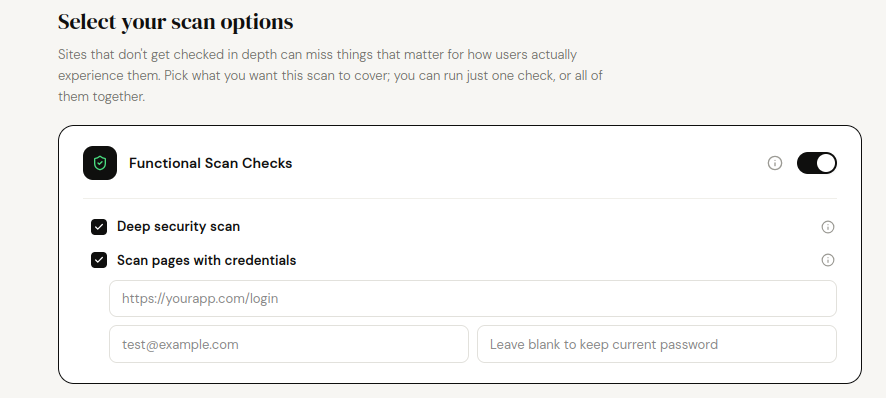
Give the scanner a demo login so it can go past your sign-in page and check what your users only see once logged in (dashboards, account settings, and so on). Vibe & Go doesn't create this account for you: you set one up on your own app first, then hand the details to the scanner.
- 1. Go to your own app's sign-up page (not Vibe & Go's).
- 2. Create a new account using an email address you control, ideally one dedicated to testing.
- 3. Set a simple password you'll remember.
- 4. Log in once yourself to confirm the account works and lands somewhere real (a dashboard, a home screen).
- 5. Copy the exact login page URL, plus that email and password.
- 6. Paste those three into the Scan pages with credentials fields on the New scan page.
- Always use a dedicated test account, never your real admin login.
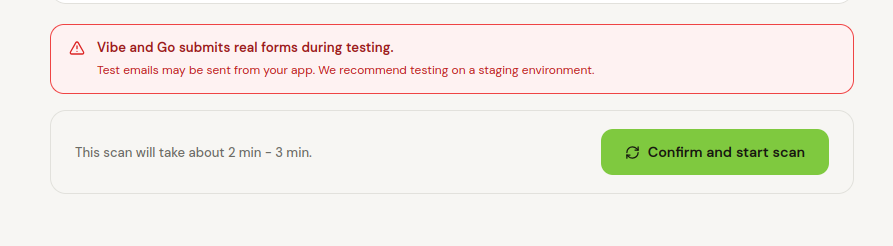
- The scanner submits real forms and can trigger real actions in your app while it's testing: don't point it at production data you can't afford to touch.
- Like Deep Security, it only makes sense together with Functional Scan Checks: it's the same crawl continuing past your login wall, not a separate check.
Documentation last updated: 2026-09-04